Issue History Reports
Access the report
Open “Apps” from your top Navigation bar. You will find “Issue History” submenu.
The report screen
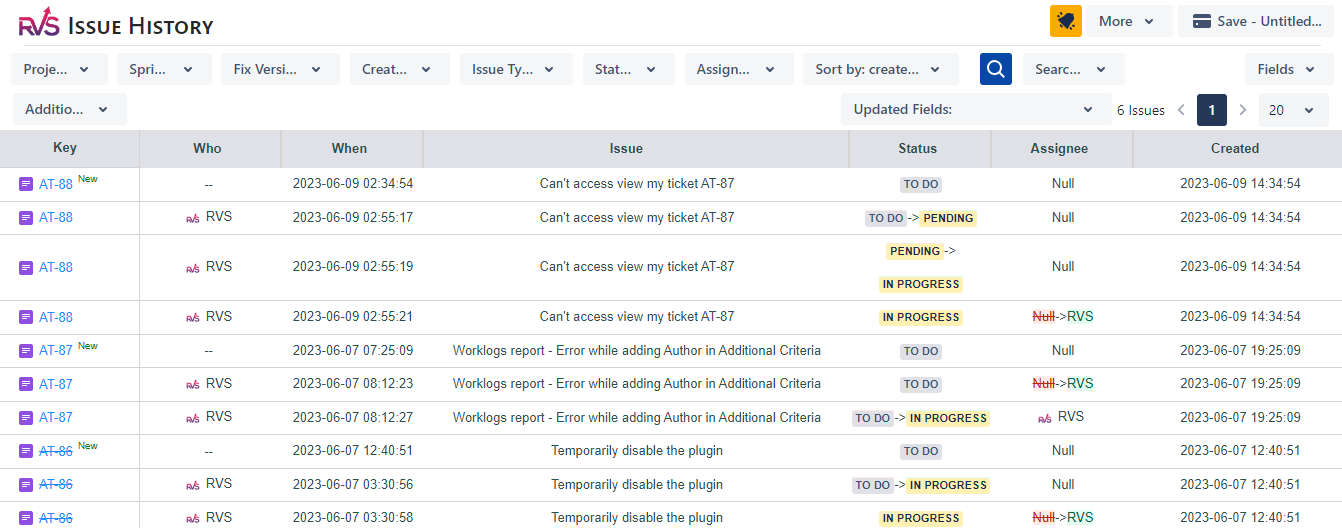
Clicking on menu will navigate to the below screen. You can filter by selecting the Project, Sprint, Fix Version, Issue created Dates, Issues Type, Status or Assignee to view the report.
Additional Filter Criteria provides the options to select Change Logs between Date range and filter for specific change author.
Updated Fields : This drop down shows all the fields which have been updated for the filtered issues.
Export to Excel : The report provides the facility to Export to Excel. The Time values in report are exported by default in Hours only to Excel in CSV format.
Settings : The time value in reports can be changed in Settings screen. They can be seen in Hours/Days & Jira default format
Help & Support
Please raise a support request here, or email us at support@votazz.co.
To help us respond quickly and accurately, include the app version, your Jira version, your browser, and the steps to reproduce the issue with examples or screenshots.