diagramsnow for Confluence

diagramsnow
diagramsnow is a Confluence Cloud app that lets you draft flowcharts, architecture diagrams, UML, BPMN, and ERDs right inside a Confluence page — no separate editor, no exported PNGs to chase. Diagrams live with the page they document.
Quick start
Insert the macro, draw the diagram, save. Three steps from a blank page to a published diagram.
Insert the macro
On any Confluence page, type /diagramsnow or pick diagramsnow from the macro browser.
Draw & edit
Click the pencil to open the full editor in a modal. Drag shapes from the sidebar, connect them, label them.
Save & close
Hit Save & Close. The diagram is attached to the page and renders inline. Click the pencil any time to edit.
Features
- Editor and viewer in one app — no separate read-only mode to install or license.
- 700+ Azure architecture icons bundled — ready to drag, no setup. Microsoft Icon Terms allow redistribution.
- One-click import for AWS, GCP, and IBM Cloud icon packs — vendor terms forbid bundling, so drop the official ZIP into the import dialog and we cache it locally on your site.
- Built-in libraries — UML, BPMN, ER diagrams, sitemaps, network gear, and wireframes ship with the app.
- Multi-tab live refresh — a coworker's save shows up in your viewer without a page reload.
- PDF and Word export — Confluence's native export preserves diagrams as inline SVG so they stay crisp at any zoom.
Install
Find diagramsnow when it lists in the Atlassian Marketplace: marketplace.atlassian.com/vendors/1219338/votazz.
While the listing is in review, contact us for early access — we'll share an install link directly.
Usage
Insert a macro
Open the Confluence page you want the diagram on, switch to edit mode, and type /diagramsnow. The slash menu surfaces the macro; pick it and a placeholder lands on the page. You can also open the macro browser (+ → Other macros) and search for diagramsnow.
Edit a diagram
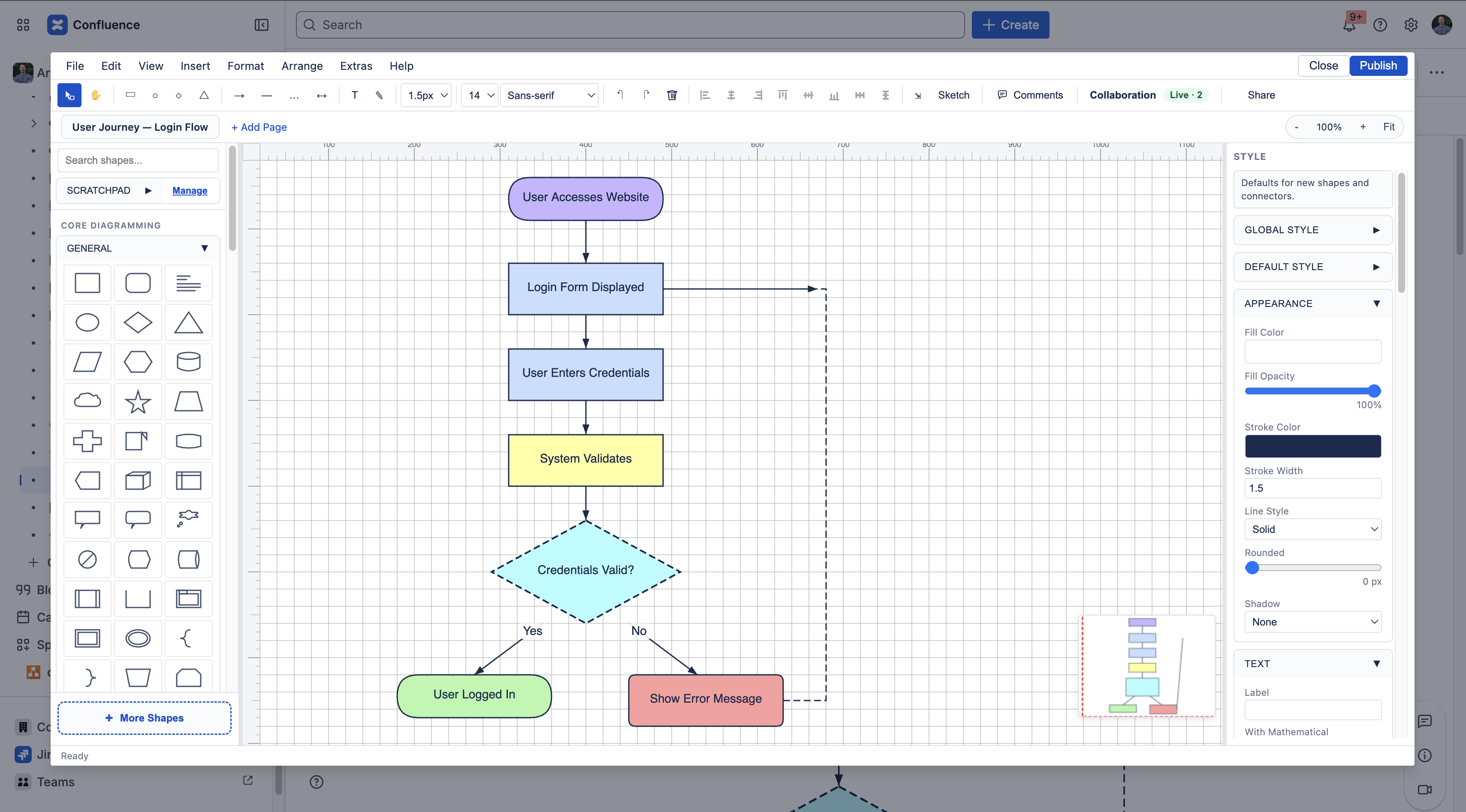
Click the pencil overlay on a diagramsnow macro to open the editor modal. The left sidebar has the shape libraries; the center is the canvas; the toolbar runs along the top. Drag shapes onto the canvas, hover an edge to draw a connector, and use the right-hand inspector to tweak colors, fonts, and arrow styles. Hit Save & Close to commit.
View a published diagram
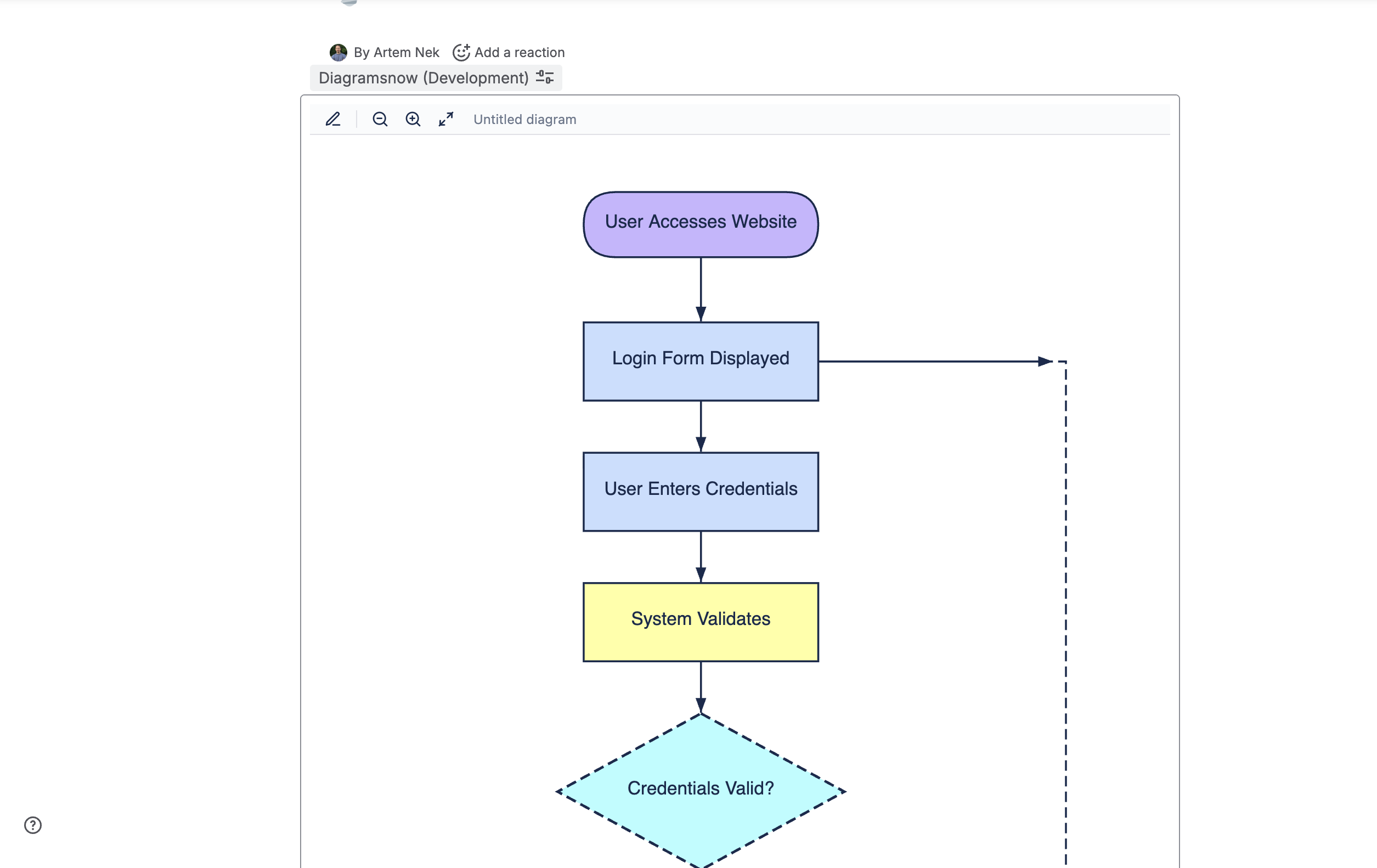
Once saved, the diagram renders inline on the page as SVG. Anyone with read access to the page sees it; no additional app or license is needed for viewers. The same SVG ships through Confluence's PDF and Word export pipelines.
Shape libraries
diagramsnow ships with everything most teams need out of the box. Vendor icon packs that cannot legally be redistributed are one click away via the More shapes → Custom imports dialog — drop the official ZIP in and we cache it locally on your Confluence site.
| Library | How you get it |
|---|---|
| Azure | 700+ icons bundled, ready to drag from the sidebar. No setup. |
| AWS | Import the official AWS Architecture Icons ZIP via More shapes → Custom imports → AWS. |
| GCP | Same flow with Google Cloud's official icon pack. |
| IBM Cloud | Same flow with IBM's GitHub icon repository. |
| UML | Built in — class, sequence, state, activity, use case, component. |
| BPMN | Built in — events, gateways, tasks, swimlanes, data objects. |
| ER diagrams | Built in — entities, attributes, relationships in Chen and crow's-foot notations. |
| Sitemaps | Built in — page nodes, navigation hierarchies, breadcrumbs. |
| Network | Built in — routers, switches, firewalls, generic appliance icons. |
| Wireframes | Built in — desktop and mobile UI primitives for low-fi mocks. |
Keyboard shortcuts
All shortcuts apply to the editor modal. Use Cmd on macOS, Ctrl on Windows / Linux.
| Shortcut | Action |
|---|---|
Ctrl/Cmd + Z | Undo |
Ctrl/Cmd + Y | Redo |
Ctrl/Cmd + C / V / X | Copy / Paste / Cut |
Ctrl/Cmd + D | Duplicate selection |
Ctrl/Cmd + A | Select all |
Ctrl/Cmd + G | Group selection |
Ctrl/Cmd + Shift + G | Ungroup |
Ctrl/Cmd + B / I / U | Bold / Italic / Underline (text) |
Ctrl/Cmd + F | Find on canvas |
Ctrl/Cmd + Shift + F | Find & Replace |
Ctrl/Cmd + K | Shape tags |
Ctrl/Cmd + 0 | Reset zoom |
Ctrl/Cmd + + / - | Zoom in / out |
Ctrl/Cmd + Shift + H | Zoom to fit |
Ctrl/Cmd + Shift + L | Toggle layers panel |
F5 | Toggle presentation mode |
Delete / Backspace | Delete selected (hold Shift to also delete attached connectors) |
Tab / Shift + Tab | Cycle through shapes |
Enter / F2 | Edit text on selected shape |
Space (hold) | Temporary pan mode |
Alt + C / Alt + V | Copy style / Paste style |
Alt + Shift + ArrowKey | Align selected shapes left / right / up / down |
Use cases
Four common scenarios for diagramsnow inside Confluence. Pick the closest fit to start; diagrams scale from one-off sketches to fully maintained architecture references.
Architecture review for a new service
Drop AWS, Azure or GCP icons onto the canvas, connect them with labeled arrows, publish on the design doc page. Reviewers can edit in place.
Tip: keep one diagram per service so the review history stays focused.
Sprint retrospective action items
Fast flowchart: problem → action → owner. Lives on the retro page; no separate Miro board to chase.
Tip: colour-code by owner so follow-ups are easy to scan in the next retro.
Customer-journey or BPMN process map
Built-in BPMN library covers events, gateways, tasks. Use it on the customer-success runbook.
Tip: swimlanes for each team (sales, onboarding, support) keep handoffs explicit.
Network topology / system map
Built-in network shapes plus IBM Cloud or Cisco imports. Pin to the team's infra wiki page so on-call has the picture.
Tip: link each node label to its runbook page for one-click pivots during incidents.
Compatibility
- Confluence Cloud — required. No Data Center build planned at this time.
- Browser — latest two major versions of Chrome, Edge, Firefox, Safari. Older browsers fall back to a read-only viewer.
- Mobile — viewer renders correctly on mobile Confluence. The editor is optimised for desktop / laptop; mobile editing is supported but not the primary target.
- No installation on user laptops — runs entirely inside Confluence via Atlassian Forge.
Data residency
Where diagrams live. Diagrams are stored in Atlassian Forge App Storage (KVS) under the same Confluence site that hosts them. The data sits in the Atlassian data centre region you selected when you created your Confluence Cloud site — diagramsnow does not transfer or replicate diagram content outside that region.
What stays in the browser. Imported vendor icon ZIPs (AWS, GCP, IBM Cloud) are cached in your browser's local storage so the editor doesn't fetch them on every load. Clearing site storage removes the cache; the next editor open re-imports from the ZIP you uploaded.
No external services. diagramsnow does not call any third-party APIs. The Atlassian Marketplace listing carries the “Runs on Atlassian” badge — all compute and storage stays on Atlassian infrastructure.
FAQ
- Are diagrams stored on your server?
- No. They live in your Confluence site via Atlassian Forge App Storage. We never see or copy your diagram content — see Data residency above.
- What's the maximum diagram size?
- Up to ~50 MB of raw XML per diagram (about 100 000 shapes for a typical layout). The editor stays responsive on diagrams in the low tens of thousands of shapes; larger ones may slow on render-heavy panning.
- Can I import existing draw.io / mxGraph diagrams?
- Yes — paste the mxGraph XML into a blank diagram via File → Open and it converts on the fly. Most shapes, connectors, and styles map directly; vendor-icon references that point at hosts we don't bundle are replaced with placeholder rectangles you can re-link to one of the supported icon packs.
- Does PDF / Word export preserve diagrams?
- Yes. Confluence's PDF and Word export pipelines pick up the diagram as an inline SVG attachment, so the exported document carries the actual diagram (not a “click to view” placeholder).
- How are vendor icons (AWS, GCP, IBM) handled if I don't import a ZIP?
- The corresponding library panel shows an empty state with a one-line instruction telling you which official ZIP to download from the vendor and drop into the editor. Once imported, the icons cache locally and are ready to drag onto the canvas.
- What licence model will diagramsnow use on Marketplace?
- The pricing and edition are being finalised. The current pre-launch build is full-featured for early-access partners. Contact us at support@votazz.co to discuss your team's needs.
Privacy & data
Diagrams stay inside your Confluence site. diagramsnow does not transmit diagram content to third parties. See the full privacy notice for the data-flow specifics.
Contact
Need help, found a bug, or want early access while the Marketplace listing is in review?
Email support@votazz.co or visit our support page — we read every message.
Changelog
-
v5.20.0 2026-05-12
Initial release.