Secret Managers for Bamboo
Secret Managers for Bamboo connects Atlassian Bamboo Data Center with external secret managers, so builds and deployments use secrets that are kept and managed outside Bamboo.
Instead of storing a password or token in a Bamboo variable, you put a reference to it in the variable value, for example %vault:bamboo/project-a/db-password%. When a build or deployment starts, the plugin resolves the reference with the secret manager and hands the value to the job. The value only exists in memory for as long as it is needed and is masked in the logs.
Supported secret managers:
- AWS Secrets Manager
- Azure Key Vault
- CyberArk Conjur
- GCP Secret Manager
- HashiCorp Vault
- Oracle Cloud Vault
- Thycotic Secret Server
- Keeper Secrets Manager
| Item | Details |
|---|---|
| Latest version | 2.4.0 |
| Hosting | Bamboo Data Center 12.0.0 to 12.1.12 |
| Marketplace | Secret Managers for Bamboo |
To get started, pick the tutorial for your secret manager below, then read Variable Syntax and Scoping.
Tutorials
Step-by-step setup for each secret manager:
The Big Picture
This page frames the Secret Managers for Bamboo plugin in a typical setup, involving two major stakeholders: the system administrators, managing the company infrastructure and user permissions, and the software development team, involved in one or more projects.
Developers need sufficient freedom in creating and configuring the builds required for their project, as to avoid inefficient back-and-forths between administration and development. On the other hand, administration wants to avoid exposing the secrets required by the builds as much as possible, including leaking secrets between different projects and teams. In practice, developers should not need to know nor care about the actual values of the secrets they need.
In order to achieve these goals, the administrators configure the systems as illustrated in the schema below.
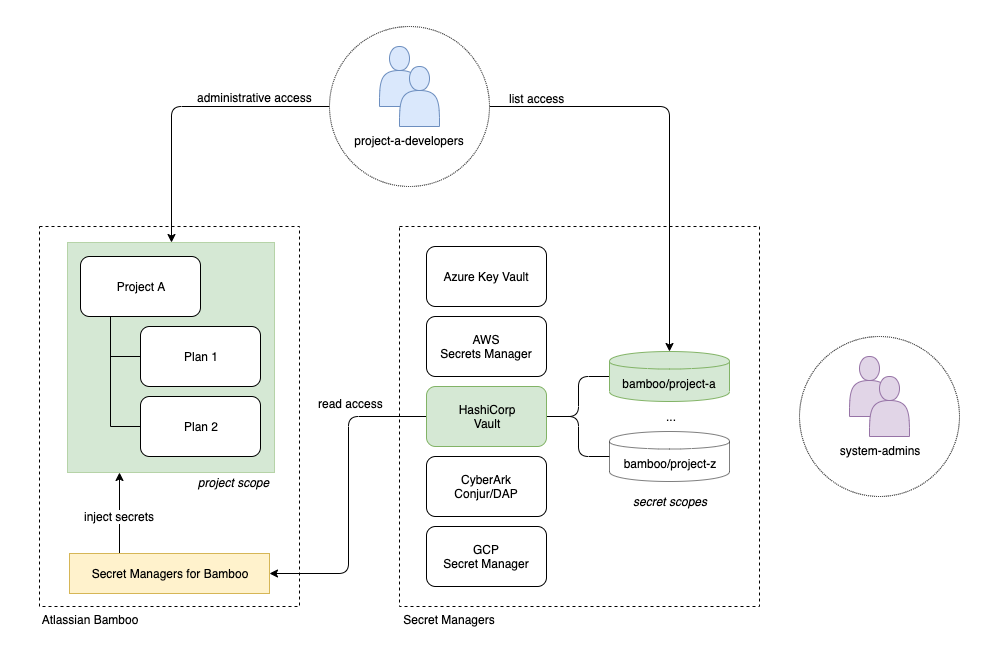
The administrators:
-
Create a Bamboo group project-a-developers, and a project Project A. The group receives 'create plan' permissions over the project, so (additional) plans can be created at will. The group furthermore receives 'edit', 'build' and/or 'admin' permissions defined as inherited plan permissions, allowing them to manage all plan related configurations (including the management of variables).
-
Create a secret scope in the secret manager dedicated to the project. How the secret scope is defined depends on the specific manager. For example: when using Azure the scope would probably be a distinct vault, while HashiCorp Vault can easily be scoped based on paths. The depicted example uses HashiCorp Vault with a secret scope bamboo/project-a.
-
Create two entities in the secret manager holding rights over the secret scope. A 'project-a-developers' group (mirroring the Bamboo group) allowed to list the secret names, and an account dedicated to the Secret Managers for Bamboo plugin. The latter only requires read access to the individual secrets.
-
Configure a secret manager in the Secret Managers for Bamboo plugin, using the dedicated account. The manager is scoped in Bamboo to 'Project A', excluding secret resolution from any other project. The name of the specific manager is communicated to the developers, and should not change over the lifetime of the project.
Administrators and developers can subsequently work independently. As the project evolves, the administrators will bring project specific infrastructure online, and while doing so add the secrets relevant to development to the secret manager scope. Developers can consume the secrets by adding them as variables in their builds, simply using the Bamboo secret manager name and the names of the secrets.
Variable Syntax
General
Once a secret manager is defined on the administrative page of the plugin, secret values held by the manager can be referred to from Bamboo Global, Project, Plan and Environment variable values using the following unified syntax:
%<secret-manager-name>:<secret-path>[:<secret-discriminator>]%
The variable value must start and end with the '%' marker character, and consists of a maximum of three distinct parts separated by a colon ':' character. The different parts are discussed below.
Part 1: secret-manager-name
This is the name of the secret manager and matches the Display name field in both the secret manager configuration dialogs, as well as the overview table on the administrative page as shown below.
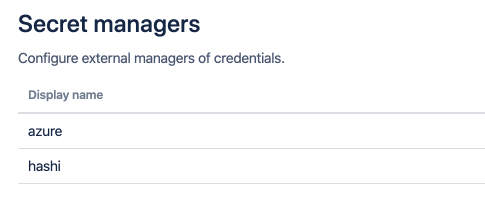
The secret manager name can be chosen at will, but can only contain alphanumeric characters and the dash '-' character. The name must be unique and is preferably stable, as to avoid breaking the resolution of variables referring to the manager.
Part 2: secret-path
The secret path is defined as follows:
[(<path-section>/)*]<secret-name>
At least the name of the secret is required. Some secret managers support structuring secrets hierarchically, which can be expressed using the leading path sections. Each path section must be separated by a forward slash '/' character.
Both the path sections and the secret names can contain all characters except the colon ':', percent '%' and backslash '\' characters. However, individual secret managers might impose more restrictive naming rules.
Part 3: secret-discriminator
This part is fully optional, and most use-cases will be covered without ever needing a discriminator. When no discriminator is provided, the plugin falls back to sensible default behaviour. The accepted discriminator values are specific to each secret manager. The table below lists the different options.
| Secret manager | Discriminator values | Default behaviour | Example |
|---|---|---|---|
| AWS Secrets Manager | When the discriminator is formatted as a GUID, the plugin assumes a version id. Otherwise, the discriminator is interpreted as a secret stage label. | Fetch the secret with the AWSCURRENT stage label. | 106b6dfb-d4d9-4a79-bdfb-3188d73b5ac1 or AWSPREVIOUS |
| Azure Key Vault | The discriminator is the secret version. | Fetch the latest secret version. | 97329aedab024ee9ba707139008c164b |
| CyberArk Conjur | The discriminator is the secret version. | Fetch the latest secret version. | 3 |
| GCP Secret Manager | The discriminator is the secret version. | Fetch the latest secret version. | 3 |
| HashiCorp Vault KVv1 | Not defined, any discriminator value is simply ignored. | not applicable | not applicable |
| HashiCorp Vault KVv2 | The discriminator is the secret version. | Fetch the latest secret version. | 3 |
| Oracle Cloud Vault | The discriminator can be the secret version (integer value) or the secret stage. The stage can be one of the following values: CURRENT, PENDING, LATEST, PREVIOUS or DEPRECATED. | Fetch the secret in the CURRENT stage. | 3 or PREVIOUS |
| Thycotic Secret Server | The discriminator is the secret field item slug (url-friendly field name as defined by the template). | Fetch the secret field item which is of type password. When multiple field items are of type password, an error is thrown. | username |
| Keeper Secrets Manager | The discriminator is either the field type, the field label or a derived name. Full details can be found below. | Fetch the secret field item which is of type password. | login |
Keeper Secrets Manager: Supported Discriminators
The table below lists the record types and corresponding discriminator values currently supported.
| Record type | Discriminator values |
|---|---|
| Database | type, hostname, port, login, password |
| Secure Note | securenote, note, date |
| Login | login, password, url, onetimecode |
| Server | hostname, port, login, password |
| SSH Key | login, publickey, privatekey, password, passphrase, hostname, port |
Scoping
General
When creating a Secret Manager in Bamboo, its default scope is global. This implies that the secrets held by this manager can be referred to by any Bamboo (Build) Plan or (Deployment) Environment. As such, these secrets have the same permission scope as Bamboo global variables.
However, from a security standpoint, it makes sense to only expose the secrets to the Plans and Environments that actually need them. The Secret Managers for Bamboo plugin allows defining such a reduction in scope, for each individual manager.
Configuration
After defining a Secret Manager, click the Global link in the Scope column.
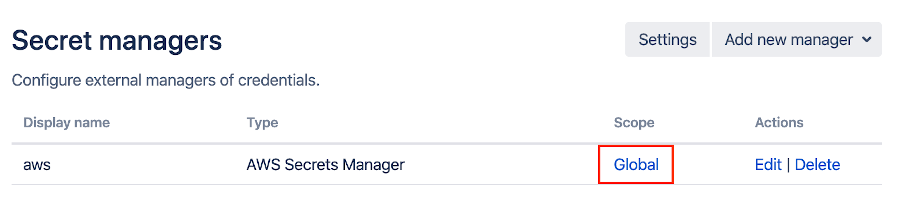
The Secret Manager scope dialog appears:
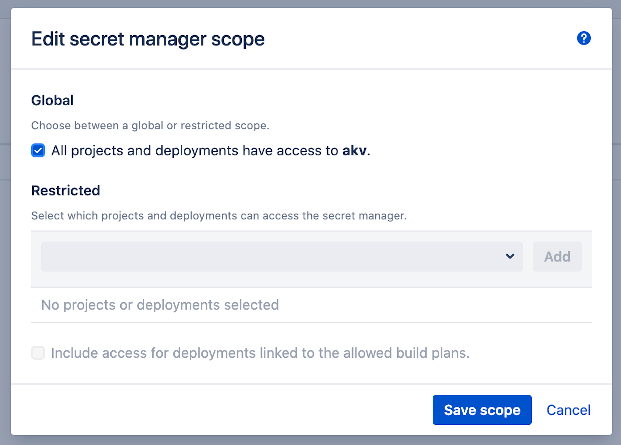
In order to restrict the scope, unselect the checkbox below the Global section first. The elements found below the Restricted section will now be enabled.
Use the search box to filter the list of Projects and Deployments.
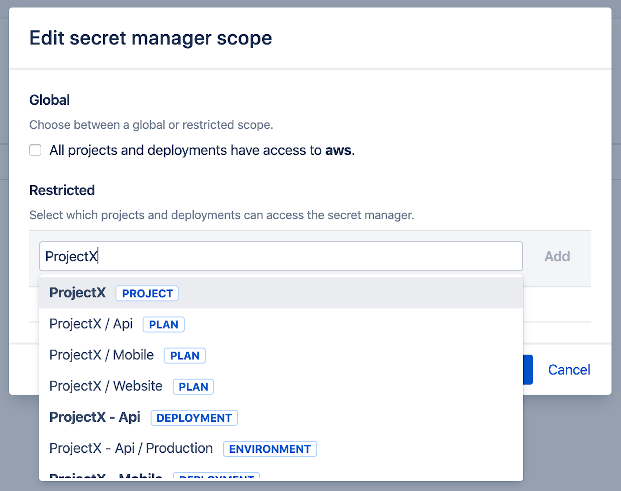
Select and add any combination of items to define the scope of the Secret Manager, given that:
- Selecting a Project implies granting access to all child Plans.
- Selecting a Deployment implies granting access to all child Environments.
As a consequence, once a Project has been added its child Plans will no longer be returned in the search results. The same principle applies to Deployments and child Environments.
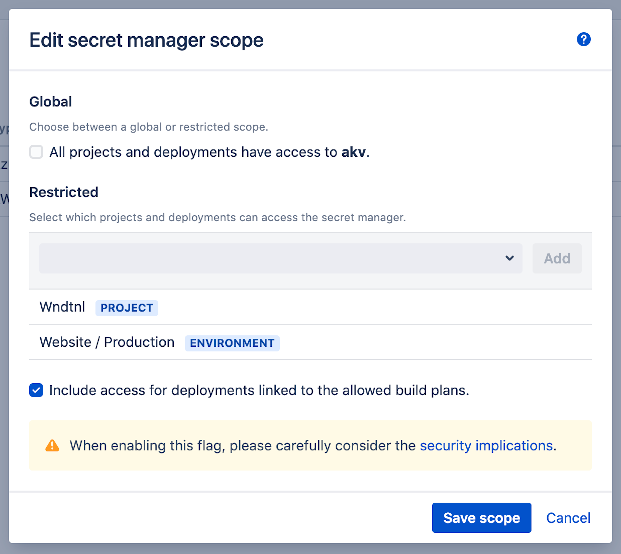
In addition, the checkbox "Include access for deployments linked to the allowed build plans." can be set as shown above. When this option is set, any deployment (and its child environments) which are linked to a whitelisted plan will automatically receive access to the Secret Manager as well.
Note that the same inheritance rules still apply. When only a build project is whitelisted and this flag is set, any future child plans as well as any deployments linked to them will receive access without the need to update the scope.
To illustrate, consider the setup depicted below.
Project (A)
  Plan (1) <- Deployment (X)
                Environment (Z)
                Envrionment (Y)
  Plan (2)
Plan (1) and Plan (2) are children of Project (A), and Plan (1) is configured as the source build plan for Deployment (X). Environment (Z) and Environment (Y) are children of Deployment (X).
- If Project (A) is whitelisted, and the flag is not set, then only Plan (1) and Plan (2) receive access through inheritance.
- If Project (A) is whitelisted, and the flag is set, then Environment (Z) and Environment (Y) receive access in addition to Plan (1) and Plan (2).
As the warning in the UI shows, be aware that this flag could lead to abuse when appropriate Bamboo permissions are not in place. When it is possible for a user to link a deployment to a plan, which is itself linked to a Secret Manager where this flag is set, secrets could inadvertently become exposed. Using the Bamboo project permissions, ensure that users and groups who can create deployments can only link with build plans to which they have the same access rights as the Secret Managers linked to them.
Save changes when done. The table will now display Restricted in the Scope column.
Usage
Referencing a secret from a build or deployment not defined within the scope of the respective secret manager will result in the following error in the build log.

Webhooks
General
Having secrets centrally managed, stored external to Bamboo and properly scoped is already a major step forward in terms of risk management. However, although the resolved secrets exist only in memory for the duration of the build or deployment, there are no guarantees that the secret values will not be revealed eventually. Secrets could end up being written to a file on disk, to the log of an external system or embedded in a build artifact. In fact, it should be assumed that secrets will be leaked sooner rather than later. As such, secrets should be considered ephemeral and not as static entities holding the same value for their entire lifetime. Systems depending on these secrets should be architected accordingly.
A classic mitigation strategy for the aforementioned risk is secret rotation. By frequently rotating a secret, its usefulness in the event of leakage is restricted in time. The question then becomes: how often should the secret be rotated? The answer to this question depends on the environment in which the secret is used, but to minimise risk should be done as close as possible to the event in which the secret could have been leaked. In the context of a CI/CD pipeline, this means at the end of a build or deployment in which the secret was used.
The Secret Managers for Bamboo plugin supports this scenario through the definition of a webhook for each secret manager. This webhook can be configured to trigger at the end of a build and/or deployment in which secrets held by the respective secret manager were involved. An external service (such as a cloud function) can then be notified and in turn rotate secrets as needed.
Configuration
After defining a Secret Manager, click the Disabled link in the Webhook column.

The Secret Manager webhook dialog appears:
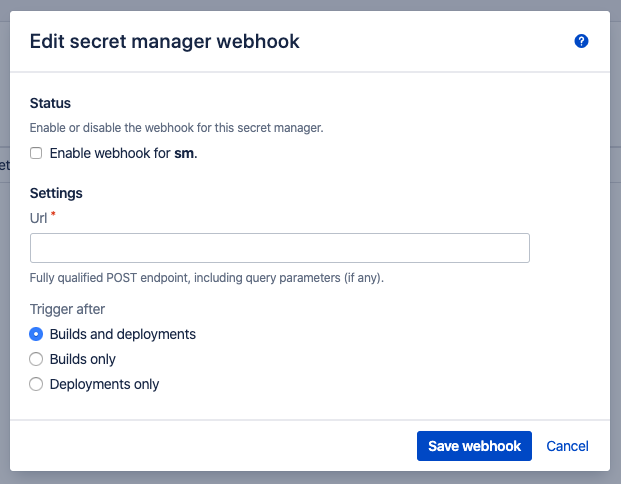
Enable the webhook by clicking the checkbox in the Status section, and complete the remaining Settings:
- Url: the fully qualified URL of the webhook, including any query parameters as needed. An HTTP POST request will arrive on this endpoint, with a JSON payload as defined below.
- Trigger after: allows restricting the context in which the webhook is triggered. For example: when a deployment is automatically performed as a result of a successful build, it is probably counter-productive to trigger the webhook at the end of the build. In that case, adjust to Deployments only. It should be noted however that such logic can be added to the service responsible for secret rotation as well, based on the provided webhook payload.
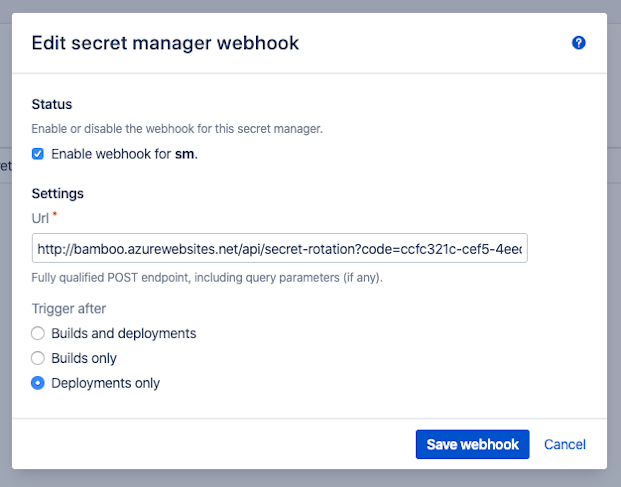
Save changes when done. The table will now display Enabled in the Webhook column.
Usage
In order to test the webhook functionality, we advice using a service such as https://requestbin.com/r which allows receiving and inspecting the webhook payload without setting up a custom service first.
When a webhook is triggered, it carries a JSON body indicating:
- For which source (i.e. secret manager) the webhook was triggered.
- For which build (i.e. combination project/plan) or deployment (i.e. combination deployment/environment) the webhook was triggered.
- Which secrets of the secret manager were part of build/deployment context.
An example build payload:
{
    "timestamp": "2020-04-08T15:56:53.470Z",
    "source": {
        "id": "292e0314-b0ec-4a19-9c1c-b7066fcba262",
        "name": "sm",
        "type": "gsm",
        "typeName": "GCP Secret Manager"
    },
    "context": {
        "type": "build",
        "result": "successful",
        "parentName": "ProjectX",
        "parentKey": "PROJECTX",
        "childName": "ProjectX - Api",
        "childKey": "PROJECTX-API",
        "version": "1",
        "branchName": "master"
    },
    "secrets": [
        "repository-root",
        "repository-pass",
        "repository-user"
    ]
}
An example deployment payload:
{
    "timestamp": "2020-04-08T16:03:23.490Z",
    "source": {
        "id": "292e0314-b0ec-4a19-9c1c-b7066fcba262",
        "name": "sm",
        "type": "gsm",
        "typeName": "GCP Secret Manager"
    },
    "context": {
        "type": "deployment",
        "result": "successful",
        "parentName": "ProjectX - Api",
        "parentKey": "3407874",
        "childName": "Production",
        "childKey": "3473410",
        "version": "release-1",
        "branchName": "master"
    },
    "secrets": [
        "repository-root",
        "repository-pass",
        "repository-user"
    ]
}
This payload allows a service responsible for secret rotation to decide when to rotate, and which secrets should preferably be rotated.
Settings
To manage the plugin global settings, select Settings in the upper-right of the Secret managers administration page. The global Settings dialog appears.
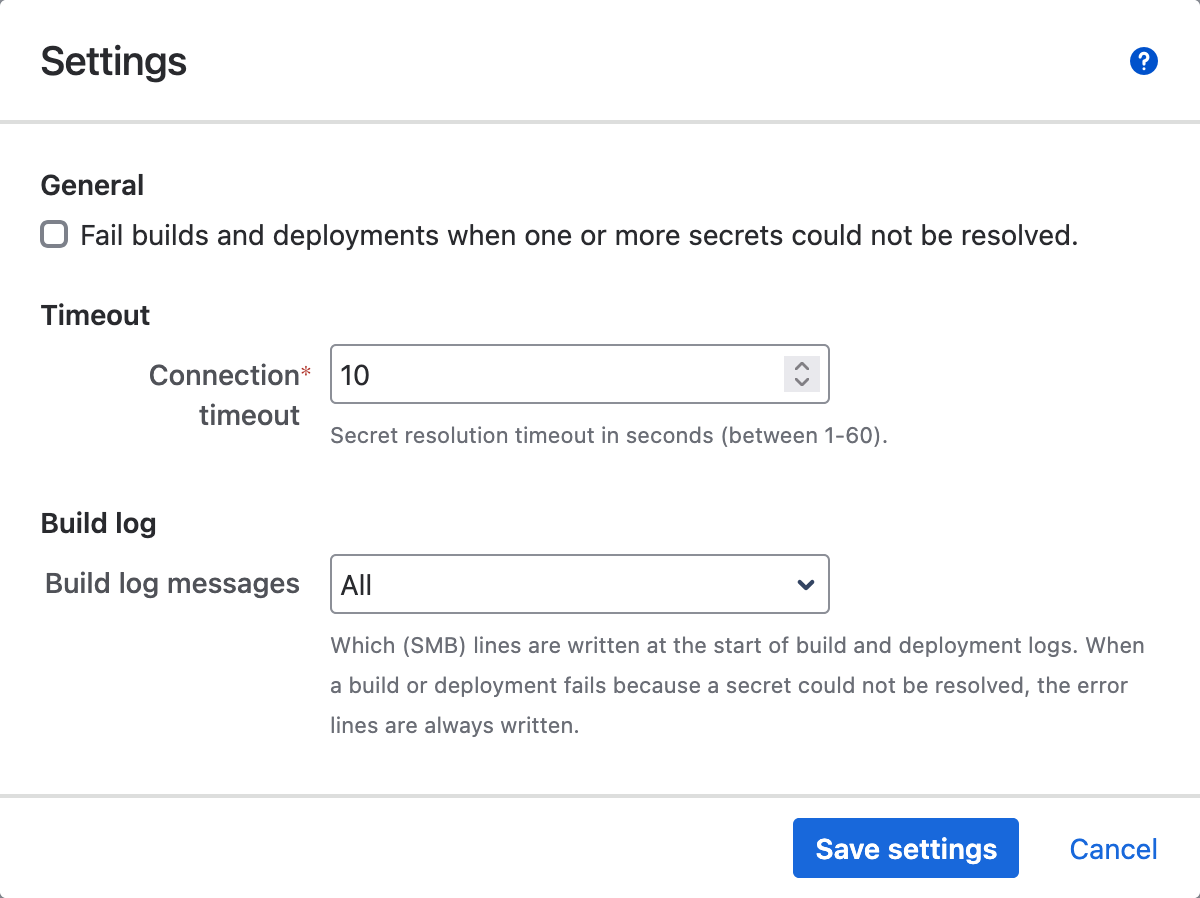
The following settings are available.
Fail builds and deployments
When this checkmark is selected, the plugin will fail each build and deployment for which at least one secret in its variable context could not be resolved. The build logs will look as follows:
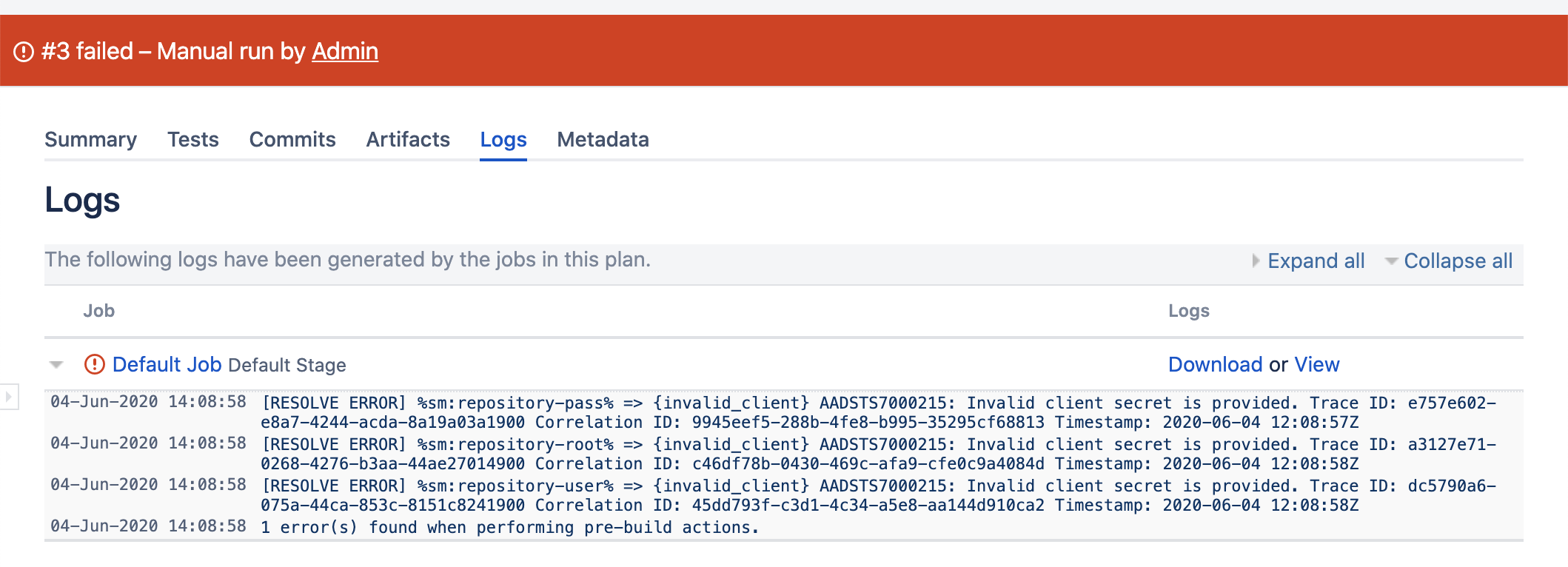
The default setting is not to fail the builds (checkmark deselected), because:
- it is assumed not all secrets in the context of a build or deployment are actually required, so a failed resolution of some secrets is not a de-facto reason to fail the entire build.
- if a secret could not be resolved and that secret is actually used in the build or deployment, the step in which the secret is used will fail anyway.
Even when this checkmark is not selected, the logs will still contain any failed resolutions.
Connection timeout
This value allows adjusting the time the plugin waits for a response from the secret manager. When secret resolution (intermittently) fails with errors related to 'connection timeouts', it is advised to increase this value.
A high value should however not be the norm, and might indicate an underlying network issue.
Build log messages
Available from version 2.4.0.
While a build or deployment is queued, the plugin resolves its secrets and writes a few lines about it to the log.
These lines start with (SMB) and are the first lines of the log, before Bamboo's own lines.
If your teams parse build logs and expect them to start with Bamboo's lines, choose which lines the plugin writes:
- All (default): every line, as in earlier versions:
(SMB) Resolving secrets...,(SMB) Finished resolving secretsand, when a secret could not be resolved, the error lines. - Errors only: only the lines about secrets that could not be resolved. A build where all secrets resolve gets no
(SMB)lines. - None: no
(SMB)lines at all.
When Fail builds and deployments is selected and a build or deployment fails because a secret could not be resolved, the error lines are always written, whatever this setting, so the failure is explained in the log.
The setting does not change how secrets are resolved, applied or masked. It only controls the log lines.
With All, a build log in which one secret could not be resolved starts like this:
(SMB) Resolving secrets...
(SMB) Finished resolving secrets
(SMB) Not all secrets could be resolved
(SMB) ERROR Variable > %vault-other-project:bamboo-project-a/user1%
(SMB) ERROR Message  > secret manager "vault-other-project" is unauthorized, please adjust scope as needed
Build Project A - Plan 1 - Default Job #39 (PROJA-PLAN1-JOB1-39) is being prepared for building on agent ...
With Errors only, the same build starts with the three error lines, and a build where all secrets resolve has no (SMB) lines.
With None, it starts with Bamboo's own lines:
Build Project A - Plan 1 - Default Job #42 (PROJA-PLAN1-JOB1-42) is being prepared for building on agent ...
Remote agent on host ...
REST API
General
The Secret Managers for Bamboo plugin exposes a REST API allowing programmatic management of the administrative entities.
All endpoints follow these principles:
- Only users with administrative permissions (members of the bamboo-admin group) are authorized. The user should identify using a basic authentication header as described in the following article.
- A JSON-formatted body is expected as input (as needed), and JSON is returned as output. Each call should therefore include the Accept header with value application/json. JSON fields use the lowerCamelCase formatting.
- The base url of the API is defined as [bamboo-root]/rest/secret-managers/1.0/, for example https://bamboo.company.com/rest/secret-managers/1.0/. All defined endpoints are relative to this base url.
- For security reasons, secret manager credentials are never returned as output. Their values will be empty, even though a value was previously set. Credentials can only be created or (explicitly) updated.
Entity: Source
Secret managers are defined as Source entities.
Read All
Endpoint
GET /source
This endpoint returns a list of all defined sources. Each entity in the list contains a fixed set of fields, and a variable number of fields depending on 'type' value.
Example Input
curl "http://localhost:8080/bamboo/rest/secret-managers/1.0/source" \
     -H 'Accept: application/json' \
     -u 'admin:admin'
Example Output
Note: some fields were removed form the output as they are of no value to external clients.
[
  {
    "id": "a749b013-b5df-4f7f-9bcf-f17f2f62154e",
    "name": "azure",
    "type": "akv",
    "typeName": "Azure Key Vault",
    "isScopeGlobal": true,
    "scopeKeys": [],
    "isWebhookEnabled": true,
    "webhookUrl": "https://en0ks40r47u3ge.x.pipedream.net",
    "webhookTriggerType": "both",
    "tenantId": "b6891ba5-127a-487e-a51b-5985cdfcce7d",
    "vault": "bamboo",
    "clientId": "",
    "clientSecret": ""
  },
  {
    "id": "5aa5cf75-88f1-4f88-8830-caa6ea697b62",
    "name": "hashi",
    "type": "hcv",
    "typeName": "HashiCorp Vault",
    "isScopeGlobal": true,
    "scopeKeys": [],
    "isWebhookEnabled": true,
    "webhookUrl": "https://en0ks40r47u3ge.x.pipedream.net",
    "webhookTriggerType": "both",
    "rootUrl": "https://vault.company.com",
    "authPath": "approle",
    "enginePath": "bamboo",
    "secretPath": "",
    "roleId": "",
    "secretId": ""
  }
]
Read One
Endpoint
GET /source/<source-id>
This endpoint returns a single source, based on its (internal) ID. The entity output is identical to the Read All endpoint.
Example Input
curl "http://localhost:8080/bamboo/rest/secret-managers/1.0/source/a749b013-b5df-4f7f-9bcf-f17f2f62154e" \
     -H 'Accept: application/json' \
     -u 'admin:admin'
Example Output
Note: some fields were removed form the output as they are of no value to external clients.
{
  "id": "a749b013-b5df-4f7f-9bcf-f17f2f62154e",
  "name": "azure",
  "type": "akv",
  "typeName": "Azure Key Vault",
  "isScopeGlobal": true,
  "scopeKeys": [],
  "isWebhookEnabled": true,
  "webhookUrl": "https://en0ks40r47u3ge.x.pipedream.net",
  "webhookTriggerType": "both",
  "tenantId": "b6891ba5-127a-487e-a51b-5985cdfcce7d",
  "vault": "bamboo",
  "clientId": "",
  "clientSecret": ""
}
Create
Endpoint
POST /source
This endpoint allows creating a source.
The endpoint expects the same fields as provided through the Bamboo user interface, with the addition of the type field with one of the following values: akv (Azure Key Vault), asm (AWS Secrets Manager), hcv (HashiCorp Vault), gsm (GCP Secret Manager), cac (CyberArk Conjur), ocv (Oracle Cloud Vault) or tss (Thycotic Secret Server).
Example Input
curl -X "POST" "http://localhost:8080/bamboo/rest/secret-managers/1.0/source" \
     -H 'Accept: application/json' \
     -H 'Content-Type: application/json; charset=utf-8' \
     -u 'admin:admin' \
     -d $'{
  "name": "azure",
  "type": "akv",
  "clientSecret": "245ba81d-6077-44d7-b487-b1873ec2d7e9",
  "clientId": "2626bc26-35e6-44d0-aa96-d7d0f367fa6e",
  "vault": "bamboo",
  "tenantId": "997a0b66-7a9c-41c0-92e5-7ec2997ba100"
}'
Example Output
Note: some fields were removed form the output as they are of no value to external clients.
{
  "id": "287ff048-99ea-4d3a-9d99-79207a18fca9",
  "name": "azure",
  "type": "akv",
  "typeName": "Azure Key Vault",
  "isScopeGlobal": true,
  "scopeKeys": [],
  "isWebhookEnabled": false,
  "webhookUrl": "",
  "webhookTriggerType": "both",
  "tenantId": "997a0b66-7a9c-41c0-92e5-7ec2997ba100",
  "vault": "bamboo",
  "clientId": "",
  "clientSecret": ""
}
Update
Endpoint
PUT /source/<source-id>
This endpoint allows updating a single source, based on its (internal) ID.
The endpoint expects the same fields as when creating a source, with special handling of the credentials controlled through the withCredentials field. When this boolean field is false (the default), the credentials related fields (e.g. clientId and clientSecret for Azure Key Vault) are ignored and not updated. When the field is true, these fields are required and result in an update of the credentials as well.
Example Input
curl -X "PUT" "http://localhost:8080/bamboo/rest/secret-managers/1.0/source/287ff048-99ea-4d3a-9d99-79207a18fca9" \
     -H 'Accept: application/json' \
     -H 'Content-Type: application/json; charset=utf-8' \
     -u 'admin:admin' \
     -d $'{
  "id": "287ff048-99ea-4d3a-9d99-79207a18fca9",
  "name": "azure",
  "type": "akv",
  "withCredentials": true,
  "tenantId": "997a0b66-7a9c-41c0-92e5-7ec2997ba100",
  "vault": "projectx"
  "clientId": "274bb17e-5b08-46c0-badb-3b68ebff7877",
  "clientSecret": "4fdc49d6-8a0b-45cd-b479-34974b94fc4c"
}'
Example Output
Note: some fields were removed form the output as they are of no value to external clients.
{
  "id": "287ff048-99ea-4d3a-9d99-79207a18fca9",
  "name": "azure",
  "type": "akv",
  "typeName": "Azure Key Vault",
  "isScopeGlobal": true,
  "scopeKeys": [],
  "tenantId": "997a0b66-7a9c-41c0-92e5-7ec2997ba100",
  "vault": "projectx",
  "clientId": "",
  "clientSecret": ""
}
Delete
Endpoint
DELETE /source/<source-id>
This endpoint allows deleting a single source, based on its (internal) ID.
Example Input
curl -X "DELETE" "http://localhost:8080/bamboo/rest/secret-managers/1.0/source/287ff048-99ea-4d3a-9d99-79207a18fca9" \
     -u 'admin:admin'
Example Output
HTTP 200 OK
Entity: Scope
The Scope of a Source is defined as a sub-entity. The Source must be created first, after which the scope can be adjusted. The Scope of a Source is defined by a list of Project, Plan, Deployment or Environment keys as known to Bamboo. These keys can be retrieved from the Bamboo user interface, or from the existing REST API endpoints.
Read
Endpoint
GET /source/<source-id>/scope
This endpoint returns the scope of a single source, based on its (internal) ID.
Example Input
curl "http://localhost:8080/bamboo/rest/secret-managers/1.0/source/5aa5cf75-88f1-4f88-8830-caa6ea697b62/scope" \
     -H 'Accept: application/json' \
     -u 'admin:admin'
Example Output
{
  "id": "5aa5cf75-88f1-4f88-8830-caa6ea697b62",
  "isScopeGlobal": false,
  "scopes": [
    {
      "key": "PROJECTX",
      "name": "ProjectX",
      "type": "project"
    },
    {
      "key": "PROJECTX-API",
      "name": "ProjectX / Api",
      "type": "plan"
    },
    {
      "key": "3375106",
      "name": "ProjectX - Api",
      "type": "deployment"
    },
    {
      "key": "3375109-3440645",
      "name": "ProjectY - Api / Production",
      "type": "environment"
    }
  ]
}
Update
Endpoint
PUT /source/<source-id>/scope
This endpoint allows updating the scope of a single source, based on its (internal) ID.
Example Input
curl -X "PUT" "http://localhost:8080/bamboo/rest/secret-managers/1.0/source/5aa5cf75-88f1-4f88-8830-caa6ea697b62/scope" \
     -H 'Accept: application/json' \
     -H 'Content-Type: application/json; charset=utf-8' \
     -u 'admin:admin' \
     -d $'{
  "id": "5aa5cf75-88f1-4f88-8830-caa6ea697b62",
  "isScopeGlobal": false,
  "keys": [
    "PROJECTX",
    "PROJECTX-API",
    "3375106",
    "3375109-3440645",
    "3375107-3440643"
  ]
}'
Example Output
{
  "id": "5aa5cf75-88f1-4f88-8830-caa6ea697b62",
  "isScopeGlobal": false,
  "scopes": [
    {
      "key": "PROJECTX",
      "name": "ProjectX",
      "type": "project"
    },
    {
      "key": "PROJECTX-API",
      "name": "ProjectX / Api",
      "type": "plan"
    },
    {
      "key": "3375106",
      "name": "ProjectX - Api",
      "type": "deployment"
    },
    {
      "key": "3375107-3440643",
      "name": "ProjectX - Mobile / Production",
      "type": "environment"
    },
    {
      "key": "3375109-3440645",
      "name": "ProjectY - Api / Production",
      "type": "environment"
    }
  ]
}
Entity: Webhook
The Webhook of a Source is defined as a sub-entity. The Source must be created first, after which the webhook can be adjusted.
Read
Endpoint
GET /source/<source-id>/webhook
This endpoint returns the webhook of a single source, based on its (internal) ID.
Example Input
curl "http://localhost:8080/bamboo/rest/secret-managers/1.0/source/5aa5cf75-88f1-4f88-8830-caa6ea697b62/webhook" \
     -H 'Accept: application/json' \
     -u 'admin:admin'
Example Output
{
  "id": "5aa5cf75-88f1-4f88-8830-caa6ea697b62",
  "isWebhookEnabled": true,
  "webhookUrl": "https://en0ks40r47u3ge.x.pipedream.net",
  "webhookTriggerType": "both"
}
Update
Endpoint
PUT /source/<source-id>/webhook
This endpoint allows updating the webhook of a single source, based on its (internal) ID.
Example Input
curl -X "PUT" "http://localhost:8080/bamboo/rest/secret-managers/1.0/source/5aa5cf75-88f1-4f88-8830-caa6ea697b62/webhook" \
     -H 'Accept: application/json' \
     -H 'Content-Type: application/json; charset=utf-8' \
     -u 'admin:admin' \
     -d $'{
  "id": "5aa5cf75-88f1-4f88-8830-caa6ea697b62",
  "isWebhookEnabled": true,
  "webhookUrl": "https://en0ks40r47u3ge.x.pipedream.net",
  "webhookTriggerType": "deployment"
}'
Example Output
HTTP 200 OK
FAQ
How are secret managers credentials stored?
The secret managers credentials are securely stored in the Bamboo database using the system-wide encryption facilities offered by Bamboo since v6.0.0. The credentials are only decrypted in memory when requesting an access token from the secret manager.
For additional information, please refer to the following Bamboo documentation page.
How are remote agents handled?
The secret managers credentials and their derived features (such as access tokens) are never shared with nor transferred to remote agents to prevent abuse. The agents only see the resolved values of the secrets which are defined in the context of the running build (global variables + plan variables or global variables + deployment variables).
However, the resolved secrets are being transferred from the Bamboo server to the agent, so it is important to properly secure their connection, as well as configuring agent authentication.
For additional information, please refer to the following Bamboo documentation page.
Are proxy settings honoured?
Yes. When connecting to external secret managers, the plugin will use the same proxy settings as configured for the hosting Bamboo installation. No further configuration is needed.
For additional information, please refer to the following Bamboo documentation page.
Release Notes
2.4.0
- New setting Build log messages (Secret managers > Settings): choose which
(SMB)lines the plugin writes at the start of build and deployment logs: All (default, same as before), Errors only, or None. See Settings. - Restart Bamboo after installing or upgrading the plugin, so it is activated.
Earlier versions
All release notes are on the Atlassian Marketplace version history page.
Roadmap
The items listed below are on the plugin roadmap, to be added in a future release. The order of appearance does not denote a priority in which features will be developed. If you would like us to increase the priority of a certain item, or add something to this list, please reach out.
-
Support for Kubernetes Secrets.
-
Support for AWS Systems Manager Parameter Store, which could be used as a (cheaper) alternative to the AWS Secrets Manager.
Help & Support
Please create a support request here.